Through the GMS you can apply for funding for preclinical and clinical research, infrastructure, training and travel grants.
Please note! Grants can only be awarded upon application. Costs cannot be covered without an approved application. Approval must be obtained prior to the start of the project, travel or training.
All DZHK members have received an email with a link. Click on "activate your account". This link will be valid for 24 hours. If your link has expired or if you have not received it, you can request a new link at gms@dzhk.de.
You can still find the current deadlines for DZHK funding on the DZHK intranet. In the GMS, you will also find the deadline for each funding line that you can select.
In your GMS account, there is a menu item on the left called "Funding lines". Click on it and you will see all the funding lines you are eligible to apply for. Click on a funding line for more information. Please note: not all funding lines for which you are eligible to apply are open at all times.
You will only see funding lines you are eligible for, based on your DZHK status. Your status was determined when you joined DZHK, with Principal Investigators appointed by the general assembly. This ensures you don't waste time applying for funding you're not eligible for.
No. The main applicant must create the application using their personal account. The main applicant can then add co-applicants and administrative staff (remember to click on the 'Send invitation' button). They can then edit the application and upload documents. When the application is ready to be submitted, the main applicant must do so.
See also FAQ: Who else can edit my application?
You can add co-applicants and administrative staff to your application (under the 'Applicant' tab). These people can view and edit your application. They must have a DZHK GMS account. Partners listed in the "External co-applicants" field do not have the right to edit the application.
Once you have added co-applicants or administrative staff and saved your application, you can invite them by email to collaborate on it. Click on the 'Send invitation' button (next to the 'Submit' button). Remember to include the person's name in the email.
We manage most personal data in our central member administration system. Therefore, you cannot edit this information yourself. If, for example, your name, academic title, or institution is incorrect, please send an email to gms@dzhk.de, and we will update the information promptly.
However, a few selected fields, such as gender and date of doctoral degree, must be entered by the user and can be edited directly. To do so, please click the “Edit” button. A frame will then appear around each editable field, so you can easily see which information you can fill in or update.

No. You will know that your application has been submitted by the fact that the application status in the red status bar is no longer set to "Application creation". The status will be updated to "Final result: in progress".
Yes, but not immediately. During the review process, the person who reviews the application will create a revision – this makes your application editable again so you can fix the mistake.
If the correction is urgent and truly cannot wait until the review begins, you may contact gms@dzhk.de. The GMS team will see what it can do to help.
If you no longer wish to apply for a grant after the call deadline, you can withdraw your application at any time before the final decision has been made. To do so, simply use the "withdraw application" button.
Once your application has been withdrawn, you will not be able to edit your entries or resubmit your application.
You cannot delete an application that you have withdrawn, it will remain in the grant management system, but will not be considered by our panels.
Do not withdraw your application because you have forgotten something or made a mistake. While your application is being considered by our panels, you will have the (limited) opportunity to correct any mistakes.
You can delete your application at any time as long as it has not been submitted. The status of your application is shown in the red bar and is set to "application creation".
You cannot delete a submitted application, but you can withdrawn it at any time using the "withdraw application" button. This is located above the red bar on the left.
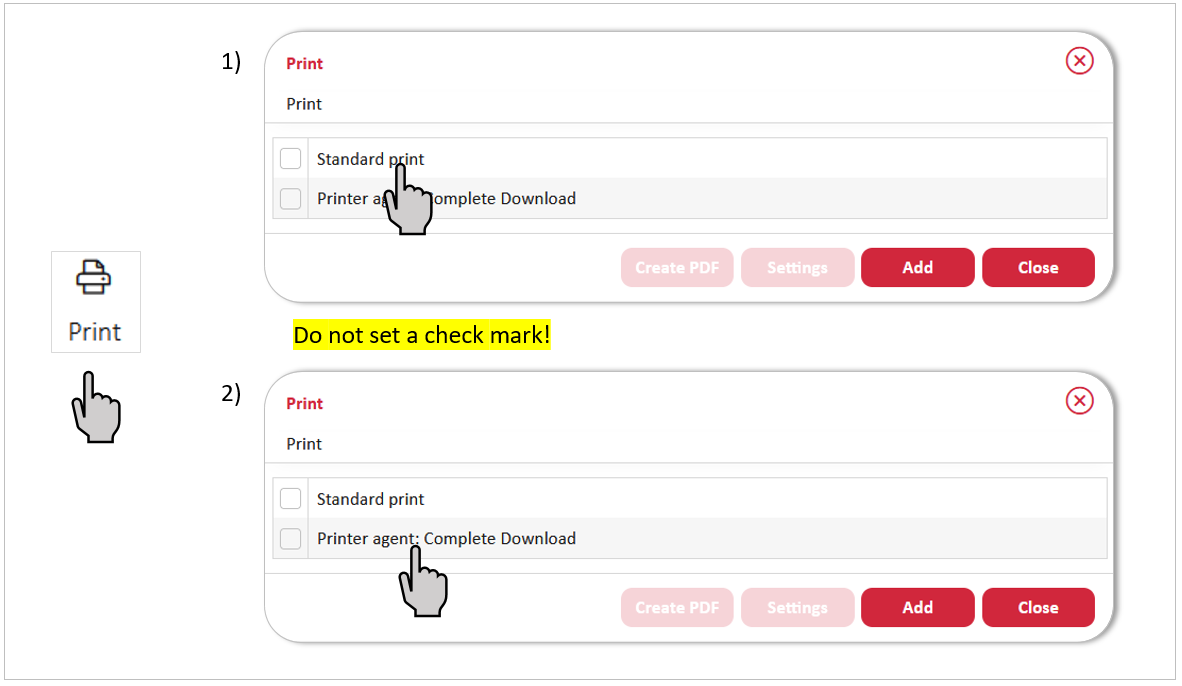
You can use the ‘print’ button to download your application as a PDF or ZIP file.
1) If you only want to download the form fields, click directly on ‘standard print’. You will receive a PDF with all the information you have entered.
2) If you want to download ZIP file with the PDF and all uploaded files, click directly on ‘printer agent: complete downlaod’.
Daily allowance and accommodation rates are listed in an Excel sheet available under the “Travel Grant” funding line in the GMS.
- For domestic travel: go to the tab of your partner site
- For international travel: go to the last tab
Your employing institution is responsible – not the DZHK. Make sure to check their specific travel rules in advance.